Franka Control Interface Overview
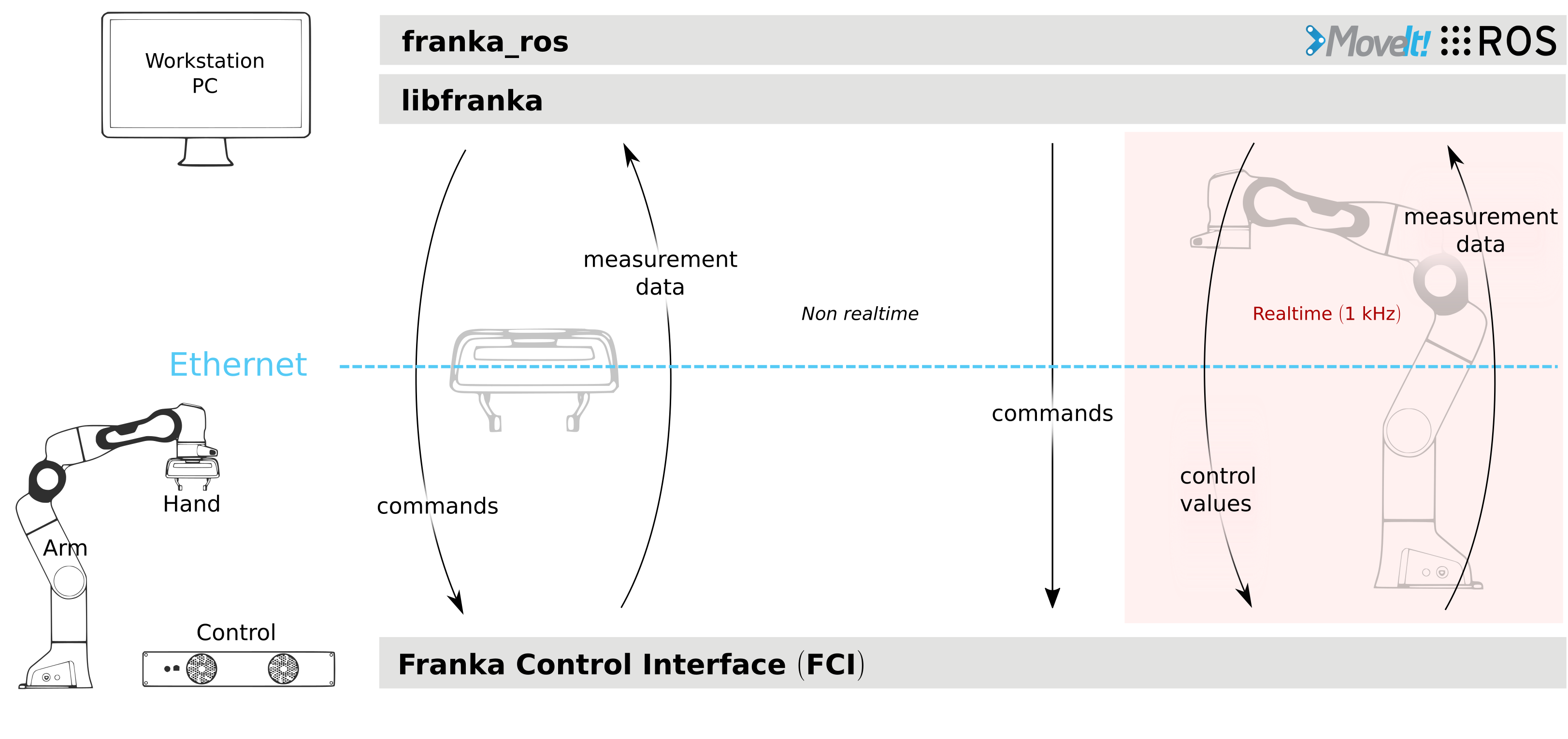
Schematic overview of the Franka Control Interface architecture.
The Franka Control Interface (FCI) provides a fast and direct low-level bidirectional connection to the Arm and Hand. It delivers real-time robot status information and enables direct control through an external workstation PC connected via Ethernet.
Using libfranka, our open-source C++ interface, you can send real-time control values
at 1 kHz using five different control modes:
Gravity and friction compensated joint-level torque commands
Joint position or velocity commands
Cartesian pose or velocity commands
Simultaneously, you receive 1 kHz measurements of:
Measured joint data, including position, velocity, and link-side torque sensor signals
Estimated externally applied torques and forces
Collision and contact detection information
The libfranka library also includes robot model functionality that provides:
Forward kinematics for all robot joints
Jacobian matrices for all robot joints
Dynamics calculations: inertia matrix, Coriolis and centrifugal vector, and gravity vector
Language and Framework Support
Python Integration
pylibfranka provides Python bindings for libfranka, enabling robot control and monitoring
in Python applications.
ROS Integration
The franka_ros and franka_ros2 packages provide integration with the ROS and ROS 2
ecosystems. They connect libfranka with ROS Control
and ROS 2 Control, and include URDF
models with detailed 3D meshes, enabling visualization (e.g., RViz, RViz2) and kinematic simulations.
MoveIt! and MoveIt 2 integration
provides motion planning capabilities and gripper control for both ROS and ROS 2 applications.
MATLAB Simulink Integration
MATLAB Simulink support enables robot control and data analysis directly within the MATLAB Simulink environment, ideal for research and prototyping workflows.
Important
The FCI transmits data over the network at 1 kHz, requiring a stable, high-quality network connection for proper operation. While the FCI is active, you have full, exclusive control of the Arm and Hand, which means you cannot use Desk or Apps simultaneously.