franka_control
The ROS nodes franka_control_node and franka_combined_control_node are hardware nodes
for ROS control that use according hardware classes from franka_hw. They provide a variety
of ROS services to expose the full libfranka API in the ROS ecosystem. The following services
are provided:
franka_msgs::SetJointImpedancespecifies joint stiffness for the internal controller (damping is automatically derived from the stiffness).
franka_msgs::SetCartesianImpedancespecifies Cartesian stiffness for the internal controller (damping is automatically derived from the stiffness).
franka_msgs::SetEEFramespecifies the transformation from <arm_id>_EE (end effector) to <arm_id>_NE (nominal end effector) frame. The transformation from flange to end effector frame is split into two transformations: <arm_id>_EE to <arm_id>_NE frame and <arm_id>_NE to <arm_id>_link8 frame. The transformation from <arm_id>_NE to <arm_id>_link8 frame can only be set through the administrator’s interface.
franka_msgs::SetKFramespecifies the transformation from <arm_id>_K to <arm_id>_EE frame.
franka_msgs::SetForceTorqueCollisionBehaviorsets thresholds for external Cartesian wrenches to configure the collision reflex.
franka_msgs::SetFullCollisionBehaviorsets thresholds for external forces on Cartesian and joint level to configure the collision reflex.
franka_msgs::SetLoadsets an external load to compensate (e.g. of a grasped object).
std_srvs::Triggerservices allow to connect and disconnect your hardware node (available from 0.8.0). When no active (commanding) controller is running, you can disconnect the hardware node, freeing the respective robots for non-fci applications like e.g. Desk-based operations. Once you want to resume fci operations you can call connect and start your ros_control based controllers again.
Important
The <arm_id>_EE frame denotes the part of the configurable end effector frame which can be adjusted during run time through franka_ros. The <arm_id>_K frame marks the center of the internal Cartesian impedance. It also serves as a reference frame for external wrenches. Neither the <arm_id>_EE nor the <arm_id>_K are contained in the URDF as they can be changed at run time. By default, <arm_id> is set to “panda”.
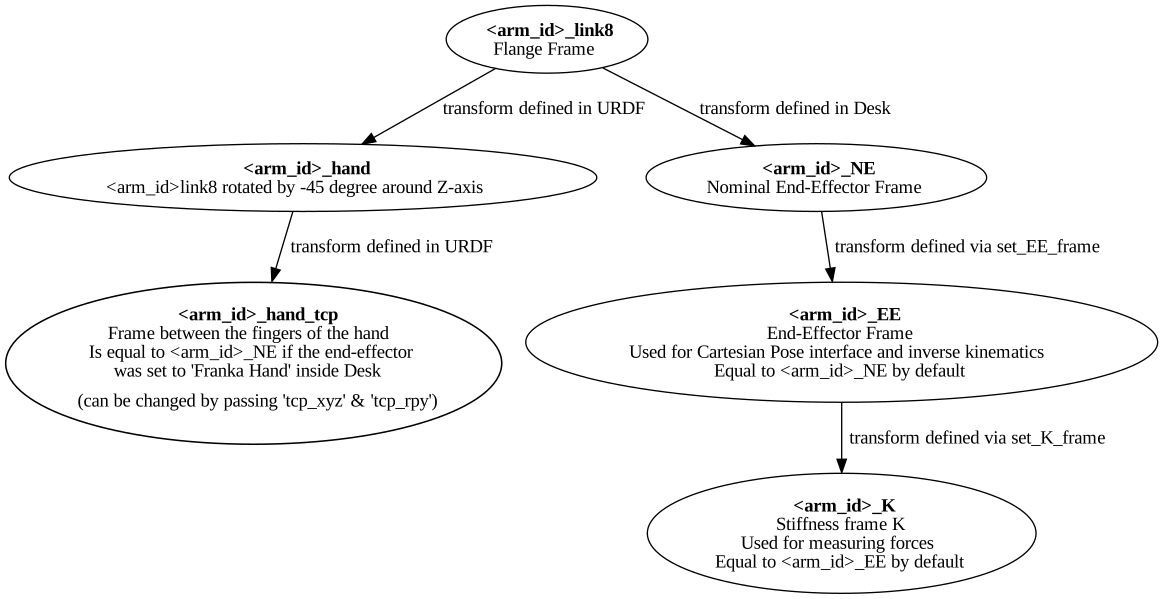
Overview of the end-effector frames.
To recover from errors and reflexes when the robot is in reflex mode, you can utilize the
franka_msgs::ErrorRecoveryAction. This can be achieved through either an action client or by publishing on the
action goal topic.
rostopic pub -1 /franka_control/error_recovery/goal franka_msgs/ErrorRecoveryActionGoal "{}"
After recovery, the franka_control_node restarts the controllers that were running. That is
possible as the node does not die when robot reflexes are triggered or when errors have occurred.
All of these functionalities are provided by the franka_control_node which can be launched
with the following command:
roslaunch franka_control franka_control.launch \
robot_ip:=<fci-ip> # mandatory \
load_gripper:=<true|false> # default: true \
robot:=<panda|fr3> # default: panda
Besides loading the franka_control_node, the launch file also starts a
franka_control::FrankaStateController for reading and publishing the robot states, including
external wrenches, configurable transforms and the joint states required for visualization with
rviz. For visualization purposes, a robot_state_publisher is started.
This package also implements the franka_combined_control_node, a hardware node for ros_control based
on the franka_hw::FrankaCombinedHW class. The set of robots loaded are configured via the ROS parameter
server. These parameters have to be in the hardware node’s namespace (see franka_combined_control_node.yaml
as a reference) and look like this:
robot_hardware:
  - panda_1
  - panda_2
  # (...)

panda_1:
  type: franka_hw/FrankaCombinableHW
  arm_id: panda_1
  joint_names:
    - panda_1_joint1
    - panda_1_joint2
    - panda_1_joint3
    - panda_1_joint4
    - panda_1_joint5
    - panda_1_joint6
    - panda_1_joint7
  # Configure the threshold angle for printing joint limit warnings.
  joint_limit_warning_threshold: 0.1 # [rad]
  # Activate rate limiter? [true|false]
  rate_limiting: true
  # Cutoff frequency of the low-pass filter. Set to >= 1000 to deactivate.
  cutoff_frequency: 1000
  # Internal controller for motion generators [joint_impedance|cartesian_impedance]
  internal_controller: joint_impedance
  # Configure the initial defaults for the collision behavior reflexes.
  collision_config:
    lower_torque_thresholds_acceleration: [20.0, 20.0, 18.0, 18.0, 16.0, 14.0, 12.0]  # [Nm]
    upper_torque_thresholds_acceleration: [20.0, 20.0, 18.0, 18.0, 16.0, 14.0, 12.0]  # [Nm]
    lower_torque_thresholds_nominal: [20.0, 20.0, 18.0, 18.0, 16.0, 14.0, 12.0]  # [Nm]
    upper_torque_thresholds_nominal: [20.0, 20.0, 18.0, 18.0, 16.0, 14.0, 12.0]  # [Nm]
    lower_force_thresholds_acceleration: [20.0, 20.0, 20.0, 25.0, 25.0, 25.0]  # [N, N, N, Nm, Nm, Nm]
    upper_force_thresholds_acceleration: [20.0, 20.0, 20.0, 25.0, 25.0, 25.0]  # [N, N, N, Nm, Nm, Nm]
    lower_force_thresholds_nominal: [20.0, 20.0, 20.0, 25.0, 25.0, 25.0]  # [N, N, N, Nm, Nm, Nm]
    upper_force_thresholds_nominal: [20.0, 20.0, 20.0, 25.0, 25.0, 25.0]  # [N, N, N, Nm, Nm, Nm]

panda_2:
  type: franka_hw/FrankaCombinableHW
  arm_id: panda_2
  joint_names:
    - panda_2_joint1
    - panda_2_joint2
    - panda_2_joint3
    - panda_2_joint4
    - panda_2_joint5
    - panda_2_joint6
    - panda_2_joint7
  # Configure the threshold angle for printing joint limit warnings.
  joint_limit_warning_threshold: 0.1 # [rad]
  # Activate rate limiter? [true|false]
  rate_limiting: true
  # Cutoff frequency of the low-pass filter. Set to >= 1000 to deactivate.
  cutoff_frequency: 1000
  # Internal controller for motion generators [joint_impedance|cartesian_impedance]
  internal_controller: joint_impedance
  # Configure the initial defaults for the collision behavior reflexes.
  collision_config:
    lower_torque_thresholds_acceleration: [20.0, 20.0, 18.0, 18.0, 16.0, 14.0, 12.0]  # [Nm]
    upper_torque_thresholds_acceleration: [20.0, 20.0, 18.0, 18.0, 16.0, 14.0, 12.0]  # [Nm]
    lower_torque_thresholds_nominal: [20.0, 20.0, 18.0, 18.0, 16.0, 14.0, 12.0]  # [Nm]
    upper_torque_thresholds_nominal: [20.0, 20.0, 18.0, 18.0, 16.0, 14.0, 12.0]  # [Nm]
    lower_force_thresholds_acceleration: [20.0, 20.0, 20.0, 25.0, 25.0, 25.0]  # [N, N, N, Nm, Nm, Nm]
    upper_force_thresholds_acceleration: [20.0, 20.0, 20.0, 25.0, 25.0, 25.0]  # [N, N, N, Nm, Nm, Nm]
    lower_force_thresholds_nominal: [20.0, 20.0, 20.0, 25.0, 25.0, 25.0]  # [N, N, N, Nm, Nm, Nm]
    upper_force_thresholds_nominal: [20.0, 20.0, 20.0, 25.0, 25.0, 25.0]  # [N, N, N, Nm, Nm, Nm]

# (+ more robots ...)
Note
Be sure to choose unique and consistent arm_id parameters. The IDs must match the prefixes
in the joint names and should be according to the robot description loaded to the control
node’s namespace.
For more information on the parameter based loading of hardware classes, please refer to the
official documentation of combined_robot_hw::CombinedRobotHW from
https://github.com/ros-controls/ros_control.
A second important parameter file (see franka_ros/franka_control/config/default_combined_controllers.yaml as a reference) configures a set of default controllers that can be started with the hardware node. The controllers have to match the launched hardware. The provided default parameterization (here for 2 robots) looks like:
panda_1_state_controller:
  type: franka_control/FrankaStateController
  arm_id: panda_1
  joint_names:
    - panda_1_joint1
    - panda_1_joint2
    - panda_1_joint3
    - panda_1_joint4
    - panda_1_joint5
    - panda_1_joint6
    - panda_1_joint7
  publish_rate: 30  # [Hz]

panda_2_state_controller:
  type: franka_control/FrankaStateController
  arm_id: panda_2
  joint_names:
    - panda_2_joint1
    - panda_2_joint2
    - panda_2_joint3
    - panda_2_joint4
    - panda_2_joint5
    - panda_2_joint6
    - panda_2_joint7
  publish_rate: 30  # [Hz]

# (+ more controllers ...)
We provide a launch file to run the franka_combined_control_node with user specified configuration
files for hardware and controllers which default to a configuration with 2 robots. Launch it with:
roslaunch franka_control franka_combined_control.launch \
    robot_ips:=<your_robot_ips_as_a_map>                 # mandatory
    robot:=<path_to_your_robot_description> \
    args:=<xacro_args_passed_to_the_robot_description> \ # if needed
    robot_id:=<name_of_your_multi_robot_setup> \
    hw_config_file:=<path_to_your_hw_config_file>\       # includes the robot ips!
    controllers_file:=<path_to_your_default_controller_parameterization>\
    controllers_to_start:=<list_of_default_controllers_to_start>\
    joint_states_source_list:=<list_of_sources_to_fuse_a_complete_joint_states_topic>
This launch file can be parameterized to run an arbitrary number of robots. To do so just write your own configuration files in the style of franka_control/config/franka_combined_control_node.yaml and franka_ros/franka_control/config/default_combined_controllers.yaml.
Important
Be sure to pass the correct IPs of your robots to franka_combined_control.launch as a map. This looks like: {<arm_id_1>/robot_ip: <my_ip_1>, <arm_id_2>/robot_ip: <my_ip_2>, …}